
WordPress 7.0 is the most significant release since Gutenberg arrived in 2018. Scheduled for April 9, 2026 — coinciding with the Contributors Day at WordCamp Asia 2026 — it officially launches Phase 3 of the Gutenberg project, bringing real-time collaboration, native AI integration, a redesigned admin interface, new blocks, and meaningful performance improvements. After a turbulent 2025 marked by legal disputes and a reduced release schedule, WordPress 7.0 represents a deliberate return to ambition.
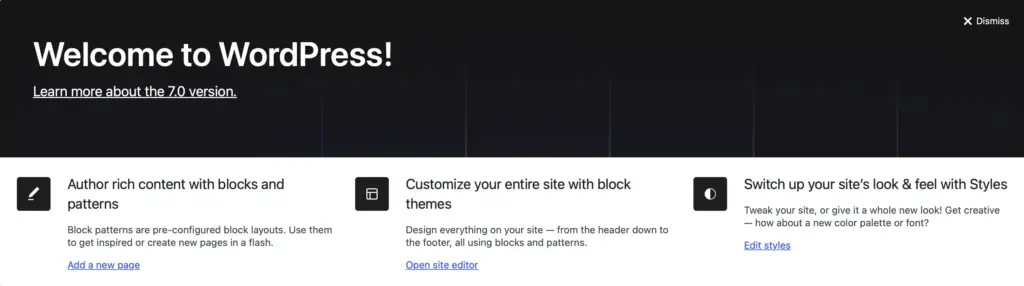
What Is WordPress 7.0?
WordPress 7.0 is the first major release of 2026. It is led by Matias Ventura as Release Lead, with tech leads Ella van Durpe and Mukesh Panchal, and coordination from Amy Kamala, Ahmed Kabir Chaion, and Mary Hubbard.
The release is the primary vehicle for Gutenberg Phase 3: Collaboration — a multi-year effort to transform WordPress from a single-author publishing tool into a team-ready platform. The stated goal is to make collaborative content creation as natural inside WordPress as it already is in Google Docs or Notion, without forcing teams to switch between tools.
After the deliberate slowdown of 2025, WordPress is also returning to a three-release cadence: WordPress 7.1 is targeted for August 19, 2026, and WordPress 7.2 is expected in December 2026.
"We're 100% aligned that 7.0 should provide real-time co-editing and better inline commenting. We have writers today that will collaborate in Google Docs on an article and then just copy and paste the whole thing into WP Admin."
Matt Mullenweg — Make WordPress Core, Phase 3 Update
WordPress 7.0 Release Timeline
Here is the full release schedule, from alpha to final launch:
| Milestone | Date | Status |
|---|---|---|
| Alpha Phase Begins | November 12, 2025 | ✅ Complete |
| Beta 1 | February 19, 2026 | ✅ Complete |
| Beta 2 | February 26, 2026 | ✅ Complete |
| Beta 3 | March 5, 2026 | ✅ Complete |
| Beta 4 | March 12, 2026 | ✅ Complete |
| Beta 5 | March 19, 2026 | ✅ Complete |
| Release Candidate 1 | March 19, 2026 | ✅ Complete |
| Final Release 🎯 | April 9, 2026 | ⏳ Upcoming |
Non-Technical Features: What's New for Site Owners & Content Teams
🤝 Real-Time Collaboration
The headline feature of WordPress 7.0 is real-time co-editing. Multiple users can now edit the same post or page simultaneously, with live cursor indicators showing exactly who is working on which block. Changes sync instantly across all connected sessions — no need to refresh, no risk of overwriting a colleague's work.
The sync engine also handles offline editing. If a contributor loses their internet connection temporarily, their work is preserved locally and re-synced automatically when they reconnect. Block-level Notes — introduced asynchronously in WordPress 6.9 — now sync in real time as well, with a keyboard shortcut for quickly adding new notes without interrupting the writing flow.
👥 Live Cursors
See each collaborator's cursor position in real time, color-coded by user. Know exactly who is editing which section.
📶 Offline Resilience
Work continues even if your connection drops. Changes are preserved locally and sync automatically when you come back online.
💬 Real-Time Notes
Leave threaded comments directly on any block. Notes sync live so writers and reviewers always stay on the same page.
Important note: During the beta period, real-time collaboration is opt-in in order to gather broader feedback before it becomes the default experience for all sites.
🎨 Admin Interface Refresh
WordPress 7.0 gives the wp-admin experience a significant visual overhaul without making it unrecognizable. The redesign focuses on making the interface feel faster, more modern, and more consistent — not replacing it wholesale.
- Fresh default color scheme with a cleaner, more modern-looking dashboard that still feels familiar.
- Smooth screen transitions replace the jarring full-page reloads of the traditional WP admin.
- DataViews replaces WP List Tables — the traditional tables used to display posts, pages, users, and custom post types are replaced with a modern, app-like interface that supports richer filtering, sorting, and layout switching.
- Modern typography and updated color profile across the entire admin area.
- Visual revision comparisons — see a side-by-side diff of block-level changes between revisions, not just raw text diffs.
⌨️ Command Palette in the Omnibar
New in Beta 5, a Command Palette shortcut now lives permanently in the upper admin bar. Logged-in editors will see a field showing a ⌘K (Mac) or Ctrl+K (Windows) symbol. Clicking it — or pressing the keyboard shortcut — opens the command palette from anywhere in the admin: while editing, designing, or just browsing plugins. This is a power-user feature that makes navigating complex WordPress sites dramatically faster.
🧱 New Blocks & Block Editor Improvements
WordPress 7.0 expands the block library and improves several existing blocks, giving content creators and designers more building blocks out of the box.
New Blocks
- Icons Block — Add inline icons to your content without a plugin.
- Breadcrumbs Block — Native breadcrumb navigation that respects your site's hierarchy, fully customizable via the block editor.
- Heading Block (standalone) — A refined, purpose-built heading block with improved controls for SEO-conscious hierarchy.
Improved Blocks
- Cover Block — Now supports video embed backgrounds, letting you set a looping video as a section background directly in the block editor.
- Grid Block — Responsive grid controls are now built in, removing the need for third-party column plugins for most use cases.
- Navigation Block — Menu changes are now easier and more reliable in fewer steps, with improved sync behavior across the site editor.
Responsive Visibility Controls
Any block can now be set to show or hide based on screen size — mobile, tablet, or desktop — directly from the block inspector. This is a long-requested feature that was previously only available through plugins or manual CSS.
🖋️ Font Library Now Available for All Themes
Previously, the Font Library — which lets site editors browse Google Fonts, upload local font files, and organize typography collections — was only available for block themes. In WordPress 7.0, it is enabled globally for all themes, including classic (legacy) themes. Whether you are running a Twenty Twenty-Five block theme or an older theme from your favourite marketplace, you now have full access to the Font Library modal from within the WordPress admin.
🖼️ Client-Side Media Processing
Uploading large images has traditionally put a heavy load on web servers, sometimes causing timeouts or upload errors. WordPress 7.0 addresses this by introducing client-side media processing. Your web browser now handles image resizing and compression before the file is uploaded to the server — reducing server load, speeding up the upload process, and improving reliability especially on slower internet connections.
Version 7.0 also brings better support for modern image formats, including AVIF and WebP, as part of this client-side pipeline.
Technical Features: What Developers Need to Know
🤖 Native AI Integration — Abilities API & WP AI Client
Rather than shipping a built-in AI writer, WordPress 7.0 takes a smarter, more extensible approach: a foundational AI infrastructure layer that any plugin, theme, or host can build on top of.
The WP AI Client
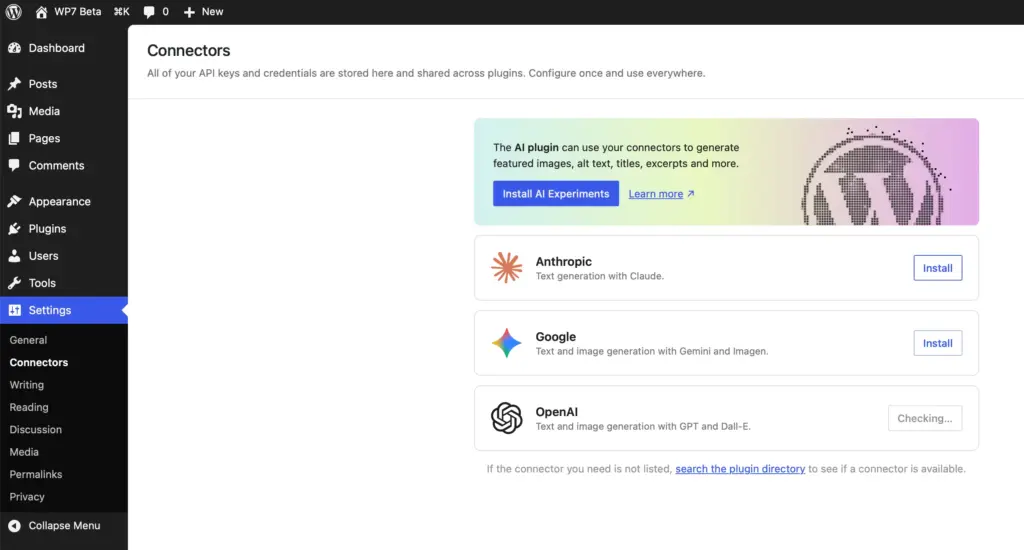
The WP AI Client is a new core component that lets users securely store API credentials for their preferred AI provider — OpenAI, Anthropic, Google Gemini, or any compatible service — directly inside WordPress. Once configured, plugins and themes can use that credential without asking the user to re-enter it. Three default providers are included, with more available via the WP AI Client registry.
The Connectors UI (Settings → Connectors)
Added in Beta 2, the Connectors page under Settings → Connectors provides a central management dashboard for all external AI connections. Users can add, update, or remove providers in one place. The architecture is extensible via a route-based system, so plugins and themes can hook in and register additional providers.
The Abilities API
The Abilities API is a client-side JavaScript API that gives developers a standardized way to define what AI capabilities are available and under what conditions. It acts as the permission layer between user intent and AI execution — preventing multiple plugins from fighting for AI control and keeping the editing experience coherent.
MCP Adapter
WordPress 7.0 also ships an MCP (Model Context Protocol) Adapter, allowing WordPress to act as a context provider for external AI agents and tools — a forward-looking addition that positions WordPress well for the growing agentic AI ecosystem.
🔧 PHP Version Requirements
WordPress 7.0 officially drops support for PHP 7.2 and 7.3. Here is the full compatibility matrix:
| PHP Version | Support Status | Notes |
|---|---|---|
| PHP 7.2 / 7.3 | ❌ Dropped | No longer supported as of WP 7.0 |
| PHP 7.4 | ✅ Minimum | Minimum required version |
| PHP 8.0 / 8.1 | ✅ Supported | Fully compatible |
| PHP 8.2 / 8.3 | ⭐ Recommended | Best performance + full AI feature access |
| PHP 8.4+ | ⭐ Best | Maximum performance and security |
Check your current PHP version by going to Tools → Site Health in your WordPress dashboard. If you are on PHP 7.2 or 7.3, contact your host to upgrade before April 9.
⚛️ React 19 Upgrade
The block editor's JavaScript layer is upgrading to React 19. This brings improved performance, better concurrent rendering, and aligns the codebase with modern React patterns. However, plugins or themes using older React lifecycle methods or deprecated APIs may encounter compatibility issues. Testing on a staging environment before upgrading is strongly recommended.
🖼️ iFrame-Based Block Editor
The block editor in WordPress 7.0 moves to an iFrame-based architecture. This isolates the editor's CSS environment from the admin UI, eliminating style conflicts between theme styles and the editor — a long-standing pain point. Plugin and theme developers should audit any CSS that targets .editor-styles-wrapper or relies on styles leaking between the admin and editor contexts.
🔌 PHP-Only Block Registration
WordPress 7.0 introduces support for registering blocks using PHP alone — without requiring a JavaScript build step. This is a significant developer experience improvement for simpler blocks, particularly for agencies building custom blocks for client sites where a full Node.js build pipeline is overkill.
🔗 Block Bindings — Pattern Override Updates
The Block Bindings API receives updates to pattern overrides, making it easier to create reusable block patterns where specific values — text, images, URLs — can be swapped out per instance while the layout stays locked. This is foundational infrastructure for more sophisticated site-builder workflows.
Performance Improvements
- Client-side media processing reduces server load during image uploads and eliminates timeout errors on large files.
- Smoother admin transitions use client-side routing to eliminate full page reloads between many admin screens.
- React 19's concurrent rendering improvements apply directly to the block editor, making it more responsive under heavy content loads.
- iFrame isolation of the editor removes style recalculation overhead caused by admin CSS leaking into the editor environment.
- PHP 8.3+ optimizations — sites running PHP 8.3 or 8.4 will benefit from JIT compilation improvements that noticeably speed up dynamic WordPress operations.
Impact on WooCommerce Sites
- The React 19 upgrade may affect WooCommerce extensions that use older React patterns. Test on staging before upgrading.
- The PHP 7.4 minimum applies to the entire WordPress installation, including WooCommerce and all plugins. Verify your hosting environment before April 9.
- The AI infrastructure layer opens doors for AI-powered product descriptions, customer service automation, and catalog management — but these will come from WooCommerce extensions building on the Abilities API, not from core itself on day one.
- The DataViews admin redesign will eventually be applied to WooCommerce's own admin screens, but this is expected in subsequent WooCommerce releases rather than immediately on April 9.
How to Prepare Your Site for WordPress 7.0
April 9 is close. Here is a practical preparation checklist to ensure a smooth upgrade — whether you are running a personal blog or managing a client's high-traffic business site.
- Check your PHP version. Go to Tools → Site Health → Info → Server. If you are on PHP 7.2 or 7.3, contact your host to upgrade to at least PHP 7.4. PHP 8.2 or 8.3 is strongly recommended.
- Create a full backup. Back up both your database and all files before upgrading. Use a plugin like UpdraftPlus, Duplicator, or All-in-One WP Migration, or use your host's backup tool.
- Set up a staging environment. Clone your live site to a staging server and test WordPress 7.0 there first. Most quality managed hosts offer one-click staging.
- Update all plugins and themes. Ensure every plugin and theme is on its latest version before upgrading WordPress core. Plugin authors have had the beta cycle to prepare compatibility updates.
- Audit React-dependent plugins. If you use plugins that ship their own JavaScript interfaces or Gutenberg extensions, confirm React 19 compatibility with the developer.
- Review custom block code. Test custom blocks against the iFrame-based editor and PHP-only registration changes. Block Bindings API pattern override changes may also require updates.
- Check WebSocket support. If you plan to use real-time co-editing immediately, check whether your host supports WebSocket connections. HTTP polling works by default, but WebSockets offer a better experience.
- Wait 24–48 hours if you are risk-averse. Hold off on upgrading production sites on day one and wait for any urgent patch releases.
WordPress 7.0 — Full Feature Summary
| Feature | Category | Who Benefits |
|---|---|---|
| Real-Time Co-Editing | Collaboration | Content teams, agencies, publishers |
| Real-Time Note Syncing | Collaboration | Editors, reviewers, writers |
| WP AI Client (Connectors UI) | AI Integration | All users, plugin developers |
| Abilities API | AI Integration | Plugin/theme developers |
| MCP Adapter | AI Integration | Developers, power users |
| DataViews Admin Redesign | Admin UX | All WordPress users |
| Smooth Screen Transitions | Admin UX | All WordPress users |
| Visual Revision Comparisons | Editing | Content creators, editors |
| Command Palette (Omnibar) | Admin UX | Power users, developers |
| Icons Block | Blocks | Designers, content creators |
| Breadcrumbs Block | Blocks | SEO, site structure |
| Cover Block Video Backgrounds | Blocks | Designers, marketers |
| Responsive Grid Block | Blocks | Designers, layout builders |
| Responsive Visibility Controls | Blocks | Designers, mobile-focused sites |
| Font Library for All Themes | Typography | All users, classic theme users |
| Client-Side Media Processing | Performance | All users, especially slow connections |
| PHP 7.4 Minimum / PHP 8.3 Recommended | Technical | Developers, hosts |
| React 19 Upgrade | Technical | Plugin/theme developers |
| iFrame-Based Block Editor | Technical | Theme/plugin developers |
| PHP-Only Block Registration | Technical | Block developers, agencies |
| Block Bindings Pattern Overrides | Technical | Site builders, developers |
Final Thoughts
WordPress 7.0 is not a routine update. It is the beginning of a new chapter — one where WordPress competes seriously as a collaborative content platform, not just a publishing tool. Real-time co-editing, a native AI infrastructure, a modernized admin, and a greatly expanded block library collectively address the most common reasons content teams reach for external tools.
The technical requirements are real: PHP 7.4 is the new floor, and React 19 will require attention from developers. But the foundation is solid, the beta cycle has been thorough, and the April 9 release date has held firm through five beta iterations without slipping.
If you are managing a WordPress site, now is the time to upgrade your PHP version, test on staging, and update your plugins. April 9 will come quickly.
WordPress 7.0 releases on April 9, 2026. Check for the update in your WordPress Dashboard under Dashboard → Updates.


0 Comments