
Home / Services / AI integration / AI forms
AI for forms and leads
Every lead read, sorted and ready for a reply.
We add AI to your forms so each entry arrives with a summary, a category and a priority score, spam is filtered out, and a draft reply is waiting. With Neural Forms, our own plugin, or on the forms you already use.
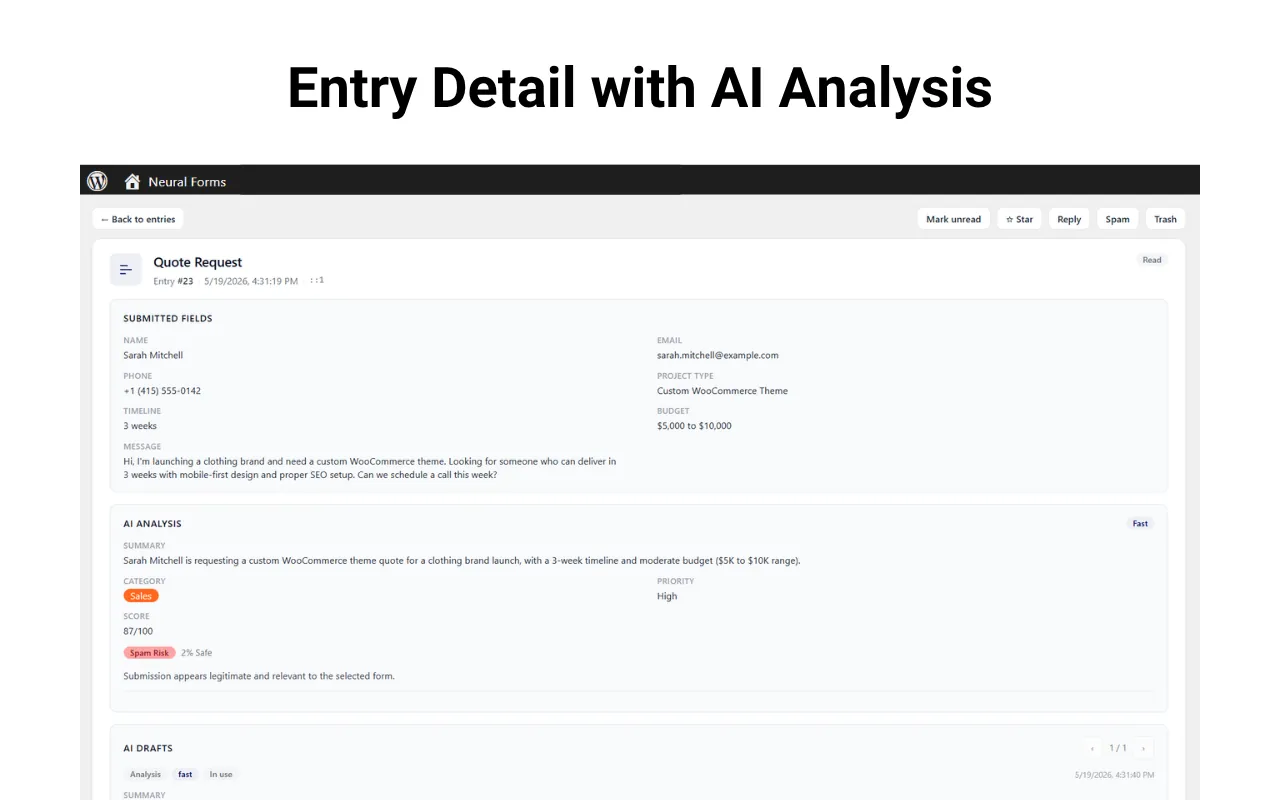
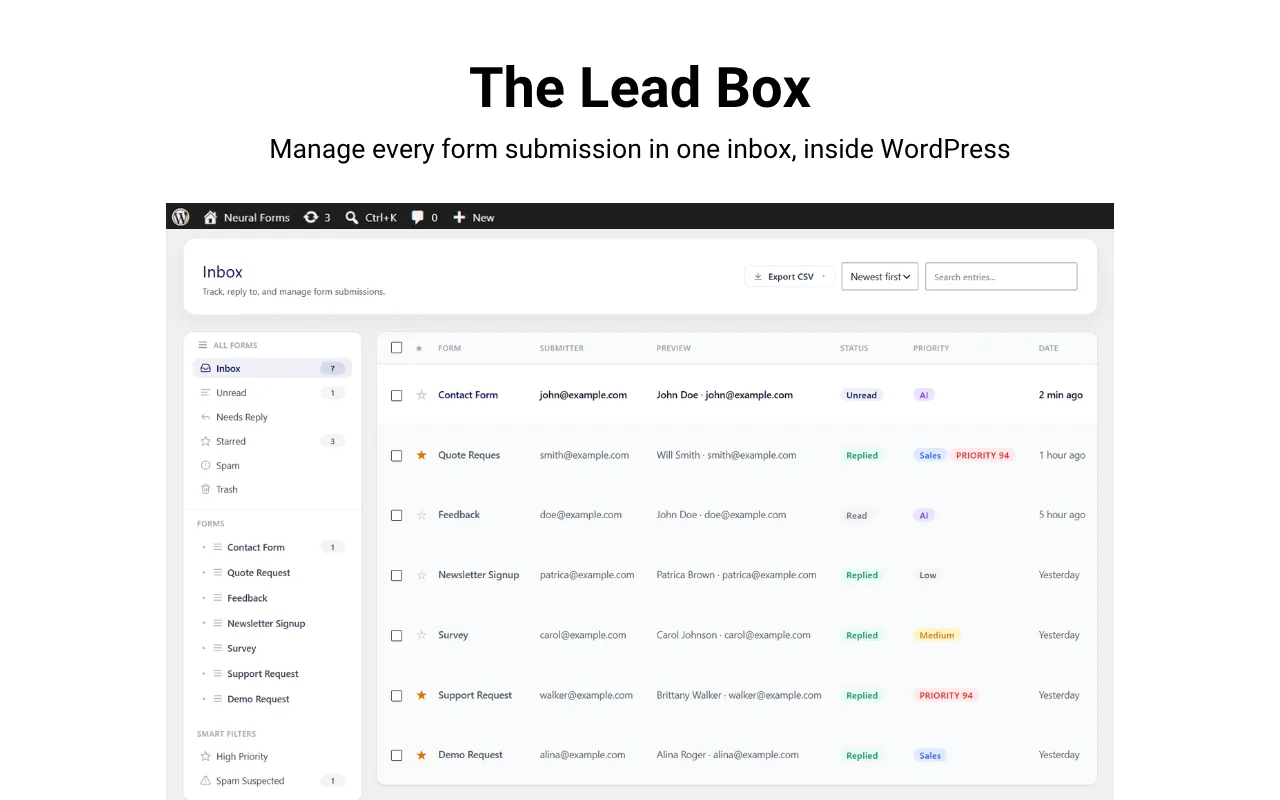
Neural Forms, our own plugin, with AI on every entry
Proof you can check
Our own products, numbers and community record, linked wherever you can check them.
 (opens in a new tab)
 (opens in a new tab)
 (opens in a new tab)
- 300,000+sites run Divi Extended (opens in a new tab)
- Platinumsponsor, WordCamp Rajasthan 2026 (opens in a new tab)
- 6 + 1free plugins and a theme on WordPress.org (opens in a new tab)
- 4.7 / 5on Trustpilot, 116 reviews of Divi Extended (opens in a new tab)
What AI adds to every entry
Leads triaged before anyone opens them.
What Neural Forms does today: summary, category, score and draft reply on every plan, spam detection on paid plans.
01
Summary
One or two lines on what the person wants, so nobody has to read a long message to triage it.
02
Category
Sales, support, enquiry and more, so each lead goes to the right person.
03
Priority score
A score from 0 to 100, so the hottest leads get answered first.
04
Draft reply
A reply drafted from the message, ready for your team to review and send.
05
Spam filtered
Junk and suspicious entries flagged before they reach your inbox.
06
Sent where it belongs
To your inbox, CRM or team chat, with the AI notes attached.
How it works
From form to first reply.
- Form sentOn your website
- AI reads itAs soon as it arrives
- Summary, category, scoreSpam flagged
- RoutedInbox, CRM or team chat
- Your team repliesWith a draft ready to send
Two ways to add it
Neural Forms, or the forms you have.
No need to rebuild your forms if they already work.
Route A
With Neural Forms
Our own form plugin with the AI built in, and a lead inbox inside WordPress. Paid plans add AI spam detection and integrations with HubSpot, Mailchimp, Zapier and WhatsApp. It imports Contact Form 7 forms in one click.
Route B
On your existing forms
Already on Gravity Forms, WPForms or Contact Form 7? We connect your entries to AI and to your CRM without switching plugins.
Guardrails
Useful, honest and in your control.
The rules we build into every AI feature, so it helps your customers without surprising them.
It says it is AI
Visitors are told they are talking to an AI. In the EU this is a legal requirement from 2 August 2026, under the AI Act.
It answers from your content
Answers come from your pages, documents and policies, not from the open internet.
A person can take over
Conversations and leads that need a human go to your team, by email, inbox or helpdesk.
You review before it goes live
Everything is tested on staging with real questions, and you sign it off.
Accounts in your name
AI provider accounts are set up in your name, so you hold the keys and pay for AI usage directly.
Costs watched
AI usage is billed per use. We estimate it in the assessment and keep an eye on it in care.
How it starts
A free assessment first. Then a quote.
No prices before we understand your site. You get the plan in writing before any work starts.
01
Free AI assessment
A 15-minute call about your site, your support and your leads. Within a few days you get a short written note: where AI fits, what we would build, and a quote.
02
Build on staging
We build and test it on a staging copy of your site, with real questions and real form entries.
03
Launch with your sign-off
It goes live when you approve it, clearly labelled as AI.
04
Care
Answers tuned, content and prompts updated, AI costs and model changes watched, using your care plan hours.
For agencies
Your development team for WordPress, under your name.
Agencies around the world send us their builds on WordPress. We do the work, you keep the client, and our name appears nowhere.
White-label
Your brand on everything. No Elicus credit, ever.
NDA-friendly
Happy to sign yours before we see a brief.
Scale on demand
We grow the team to fit the project.
Your terms
Something specific in mind? We'll talk it through.
Questions
AI forms, answered.
Do we have to switch to Neural Forms?
No. Neural Forms is the quickest route because the AI is built in, but we can add AI to Gravity Forms, WPForms or Contact Form 7 without switching.
Does the AI reply to people on its own?
No. It drafts a reply for your team to review and send. A person stays in charge of what goes out.
Which CRMs can leads go to?
Neural Forms paid plans connect to HubSpot, Mailchimp, Zapier and WhatsApp. For other CRMs, we connect through their API.
What happens to personal data?
Entries are sent to the AI provider for analysis, and we explain exactly what is sent so your privacy policy can say so. Neural Forms also has a privacy mode that stops IP and browser details being stored.
What does it cost?
Neural Forms has a free version and paid plans from $99 a year. For setup and integration work, you get a written quote after the free assessment.
Free AI assessment
Where do your leads come from?
Tell us which forms you use and where leads should go. We will set up a free 15-minute assessment and follow up with a written note and a quote.